CreateForge

Your photo, a motion reference

Car Roof Backflip AI Video Generator

Create a car roof backflip AI video from your portrait and the included motion reference. Direct one takeoff, one backward rotation and a visible landing, with editable instructions and a reference-aware credit quote.

Create your version

Seedance 2.0

One clear, well-lit portrait, with one person visible.

JPEG · PNG · WebP · ≤25 MB

Included motion reference

Sign in

Demo motion reference. AI fiction, not a real stunt to attempt.

Settings10s · 720P · 16:9
10s
Aspect Ratio16:9
Resolution

Add the required reference content before generating.

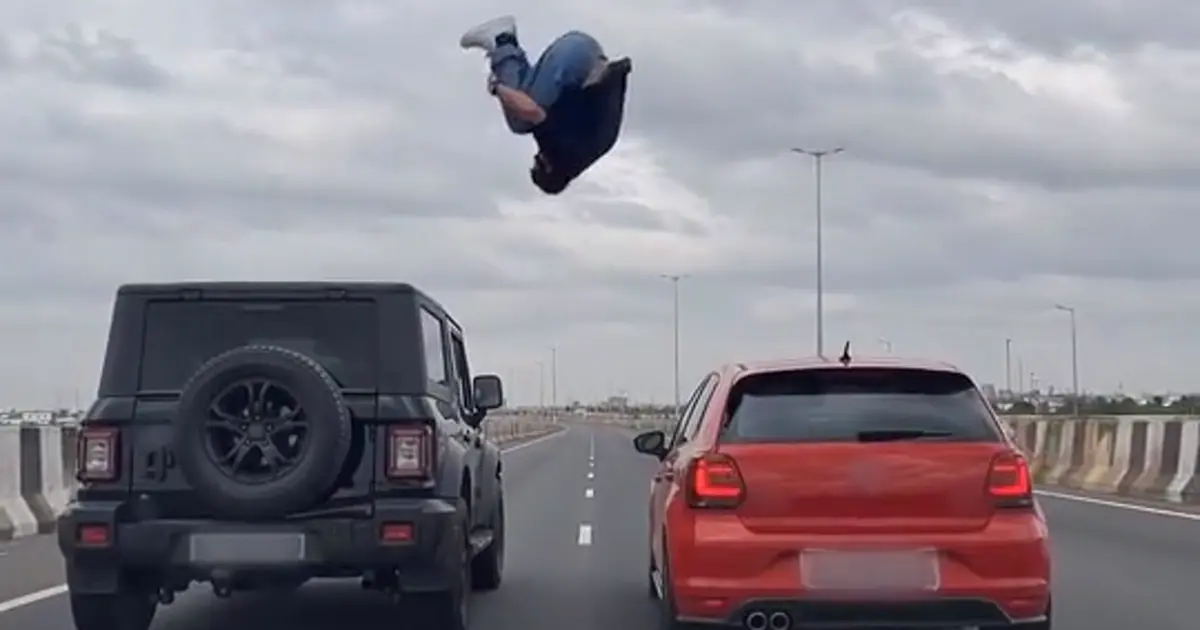
Frame from the included demo showing a fictional performer above two cars
Included demo reference, not a CreateForge generation result. New outputs will vary.

Prompts to try

One backflip, visible landing

The included reference and your photo are both required.

Use reference video 1 for the car scene, action timing and camera direction. Replace only the performer with the adult in image 1, preserving their recognizable appearance and clothing. Create a fictional AI stunt: prepare on the first car roof, take off, complete exactly one backward somersault across the gap, and land feet first in a stable crouch on the second car roof. Keep both cars upright, the body coherent and the landing visible in one continuous shot. Frame the main action as a landscape scene without the reference's decorative blurred padding. No extra people, hidden landing, logos or readable plates. Original road ambience, no copied song. This is generated fiction, not real stunt footage.

A steady camera

Reduce camera movement before adding more visual effects.

Use video 1 for one fictional car-to-car backward somersault and image 1 for the adult performer. Keep a steady wide rear camera, both cars upright, one clear takeoff and a complete feet-first landing. Preserve the performer's clothing and recognizable face. No cuts, extra limbs, text or logos. Original road sound, no copied music.

  1. 01

    Add your portrait

    Use one clear adult photo, preferably waist-up or full-body. The included clip supplies the action reference; you do not need to upload a video.

  2. 02

    Review the action and quote

    Both your photo and the motion reference must be ready. The server includes the reference video duration when calculating credits.

  3. 03

    Inspect the full jump

    Check the takeoff, rotation, landing and identity before downloading. Treat the clip as an AI effect, never as a real stunt tutorial.

How the car roof backflip effect works

This tool combines your portrait with an included demo motion reference. Seedance 2.0 uses the clip to guide the scene, timing and camera while your photo guides the performer. It generates a new video rather than pasting a face onto unchanged frames.

The default is a ten-second 720P landscape clip. The reference has been saved with this project, so loading and generation do not rely on the demo website staying online. Its original audio is removed; optional sound comes from the generation model.

Why the landing needs careful review

An airborne rotation hides the face and changes the visible body shape. A result can drift in identity, add limbs, change the cars or conceal an incorrect landing. Ask for exactly one somersault, upright cars and an unobstructed feet-first ending, then inspect the complete clip.

Use a sharp adult photo with visible clothing and avoid sunglasses unless you want them in the result. If the output is unstable, simplify camera motion or retry after adjusting the prompt. This is fictional AI imagery: do not attempt a jump between real moving vehicles.

Credits and saved results

Sign in to upload references and review the current credit quote. Editing a prompt or changing a photo or setting clears the old quote. Generation starts only when you submit; opening this page or choosing a prompt does not spend generation credits.

Review the finished media before sharing. Successful results appear in Library with actual credit use. Result file URLs are public; browsing Library and task history still requires an account. References use temporary uploads, so a page refresh requires selecting photos again.

Common questions

No. This page includes a demo motion reference. After sign-in it is uploaded through the same validated reference workflow as your photo and must be ready before generation.

Video references have a duration-dependent cost in the connected model. The final server quote includes those inputs; the displayed total is not calculated from a copied demo-site price.

Yes. The server quotes the selected model, settings and references before submission. This page does not promise a free generation or copy another website's credit prices.

References guide appearance, but likeness, hands and motion can vary. Use a clear photo and inspect the result. A completed task is not a guarantee that every creative detail is correct.