CreateForge

Two photos, a gentle fantasy

Baby Knight AI Video Generator

Make a baby knight AI video from a parent photo and a child photo. Create a gentle fantasy moment where the parent kneels, takes the prop sword and offers a teddy bear, with editable direction and a live credit quote.

Create your version

Seedance 2.0

Photo 1: one adult, with a clear face.

Photo 2: your child, with the face and body visible.

JPEG · PNG · WebP · ≤25 MB

Settings10s · 720P · 9:16
10s
Aspect Ratio9:16
Resolution

Add the required reference content before generating.

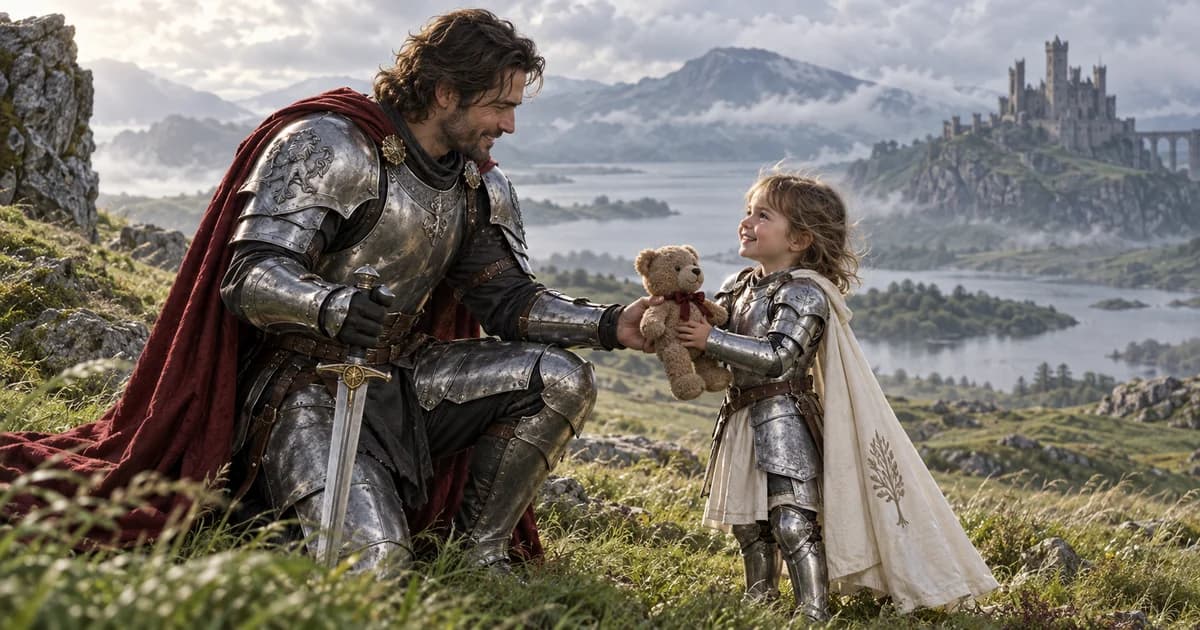
Fictional parent knight kneeling to give a teddy bear to a child in costume armor
AI-generated concept illustration with fictional people, not a Seedance video output.

Prompts to try

The teddy exchange

Parent is always Photo 1; child is always Photo 2.

Image 1 is the parent; image 2 is their child. Keep these two identities separate and preserve the child's age. A gentle fantasy scene on a misty green moor, silver costume armor, an ivory child cape and a red parent cape. The child holds a blunt theatrical prop sword. The parent approaches slowly, kneels, gently takes the prop, then hands over a soft teddy bear. The child hugs the toy and smiles; the parent stays protectively beside them. One steady child-eye-level shot, clear faces, natural hands, no combat, distress or injury. Original tender orchestral sound and wind, no lyrics, text or logos.

A quiet guardian

A simpler version when the handoff is difficult.

Use image 1 as the parent and image 2 as their child, keeping identities and the child's age separate. On a green misty moor, the parent in silver costume armor kneels beside the child and gently offers a teddy bear. The child hugs it. No sword exchange in this version. Steady low camera, clear faces, warm reassuring expressions, original soft music, no combat, text or logos.

  1. 01

    Assign parent and child

    Add the adult to Photo 1 and the child to Photo 2. These positions keep their roles stable even when uploads finish out of order.

  2. 02

    Direct a gentle exchange

    Keep the movement slow: approach, kneel, take the prop, give the toy. Review the settings and credit quote.

  3. 03

    Review both faces

    Check the child's age, both identities and the hands during the exchange before downloading or sharing.

What happens in a baby knight AI video?

The story contrasts a tiny costumed knight with a reassuring parent. The child begins holding a theatrical sword, the parent kneels and takes its weight, and a soft toy replaces it. The emotional focus is care and relief, not fighting.

This version sends both photos directly to Seedance 2.0 rather than first creating an intermediate portrait. The default is ten seconds, vertical 720P, with generated music and wind. The requested actions are creative directions, not guaranteed frame-by-frame choreography.

Prepare the two roles and check the handoff

Choose one visible person per photo. Use a clear adult portrait and a standing or full-body child photo when available. Upload your own child's photo or one their parent or guardian has authorized. Do not rely on a tiny or filtered face for identity detail.

Two identities and a prop exchange can produce blended faces, changing ages or misplaced hands. Keep one parent and one child in this version; simplify the exchange if needed. Ask for a blunt costume prop and a calm expression, with no distress or combat.

Credits and saved results

Sign in to upload references and review the current credit quote. Editing a prompt or changing a photo or setting clears the old quote. Generation starts only when you submit; opening this page or choosing a prompt does not spend generation credits.

Review the finished media before sharing. Successful results appear in Library with actual credit use. Result file URLs are public; browsing Library and task history still requires an account. References use temporary uploads, so a page refresh requires selecting photos again.

Common questions

Photo 1 is always the adult parent; Photo 2 is always the child. Replacing a photo does not swap the positions, and upload completion order does not change the roles.

Yes. The prompt assigns parent and child roles rather than requiring a particular gender pairing. This version is designed for one adult and one child.

Yes. The server quotes the selected model, settings and references before submission. This page does not promise a free generation or copy another website's credit prices.

References guide appearance, but likeness, hands and motion can vary. Use a clear photo and inspect the result. A completed task is not a guarantee that every creative detail is correct.