Seedance 2 prompts for controlled AI video shots
Twelve Seedance 2 prompt examples for product motion, portraits, environments, image-to-video, camera movement, audio timing, and short narrative shots.
By CreateForge Editorial · Reviewed 2026-08-18
Independent editorial cover. The uncropped provider-verified output and its production context appear below.
Seedance 2 prompts should describe one timed shot with a start state, action, camera relationship, continuity rules, sound direction, and a clear end state. A Seedance 2 prompt is a shot direction, not a screenplay. It should establish the starting state, primary action, camera behavior, environment, pace, ending condition, and sound intent for one continuous clip. When references are used, the prompt also needs to define what each source contributes and what remains stable.
The twelve examples cover text and image-led workflows. Adapt their structure to the current CreateForge controls, keep one main action per first test, and review the complete saved clip for identity, motion continuity, frame edges, and audio timing before expanding the scene.
Production evidence
Provider-verified output behind this guide
The displayed output comes from the documented production acceptance. Prompt pages provide reusable templates below; they do not claim that every template produced this one evidence image.
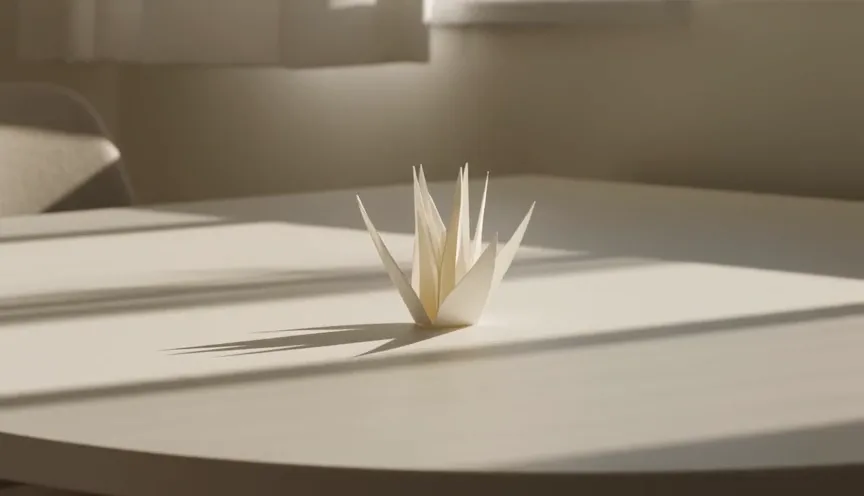
Provider-verified production output
Public brief summary: one controlled continuous shot used to verify provider submission and video output handling; the complete acceptance prompt remains private.
- Verified
- 2026-08-17T12:28:14.222Z
- Settings
- reference-to-video workflow · reference input · provider success · 1 video
- Result
- Provider task succeeded with one video output during the documented production acceptance.
01
Seedance 2 prompts: structure one continuous shot
Use verbs with direction and pace. A package rotates one quarter-turn clockwise and settles is clearer than a dynamic product reveal. State the camera separately: static, slow push, orbit, lateral track, or handheld follow. Then add environmental movement only when it supports the main action.
End with the condition that should be visible in the final moments. This helps the model allocate the selected duration. If the prompt asks for a reveal, transformation, second location, and a closing logo at once, each beat receives less time and continuity becomes harder to preserve.
02
Explain what references control
A first frame defines the opening composition; a reference image may define appearance; a reference video may define movement; audio may define rhythm or timing. Use only inputs supported by the selected mode and describe each role. Do not ask the model to infer the hierarchy from upload order.
Protect identity, geometry, wardrobe, or product marks explicitly, but review them through the clip. Video generation can drift after motion, occlusion, or camera rotation. A correct opening frame is evidence of the source, not a guarantee that every later frame remains exact.
03
Direct sound and timing deliberately
When audio is enabled, identify the source, quality, and moment: a soft mechanical click as the lid locks, distant traffic under rain, or fabric movement during a turn. Avoid generic soundtrack requests in a shot that will be edited later unless the generated music is a real delivery requirement.
Choose duration according to the action. Early tests can use the shortest setting that demonstrates movement. Longer output should create necessary temporal room, not introduce more unrelated events. Request the protected quote only after duration, resolution, input media, and audio choices are final.
04
Review motion as a sequence
Watch once for the subject, once for the camera, once for background continuity, and once with attention to sound. Scrub around occlusions and fast turns. Note exact timestamps for shape changes, edge artifacts, object duplication, sudden acceleration, or sound that occurs before or after the visible event.
Use the private Library result after reconciliation, preserve the successful controls, and revise the smallest relevant instruction. A motion problem may need a simpler verb or slower pace; an identity problem may need a stronger reference rule; a framing problem may need a better source image rather than a longer prompt.
Prompt library
Adapt these examples to a real brief
Product turntable
01A [product] stands centered on a dark stone plinth. It rotates slowly one quarter-turn clockwise while the camera makes a gentle push in. Soft rim light travels across the material, the product shape and label remain stable, the motion settles facing camera. Quiet mechanical ambience, no music or text.
One product action and one camera move create a clean first production test.
Package opening
02Close three-quarter view of [package] on a clean studio table. The lid lifts smoothly, pauses, and closes with precise alignment while the camera remains static. Warm daylight from the left, realistic hinge and shadow behavior, one soft click at closure, no hands or added objects.
A defined beginning, pause, and end make timing easy to review.
Fashion walk
03A full-length [subject description] walks three measured steps toward camera through a quiet concrete gallery. The camera tracks backward at matching speed, wardrobe fabric moves naturally, face and clothing design remain stable, soft skylight, footsteps and light fabric sound, no cuts.
Match camera pace to the subject to reduce unwanted scale changes.
Food steam detail
04Macro view of [dish] on a ceramic plate. Thin steam rises and drifts right while the camera makes a very slow lateral move left, food shape stays unchanged, warm backlight reveals texture, subtle room ambience and a quiet ceramic touch, no hands, cuts, or text.
Environmental movement supports the subject without introducing a second action.
Architecture reveal
05Start close on textured [building material], then the camera pulls back slowly to reveal the entrance of [building description] in one continuous move. People remain small scale references, late-afternoon light, stable straight lines and facade rhythm, distant city ambience, no time lapse or cut.
The pullback has one destination and protects architectural continuity.
Portrait turn
06Waist-up portrait of [subject] facing away in soft window light. The subject turns calmly toward camera and holds a neutral expression while the camera remains locked, identity, hairstyle, and clothing remain consistent, subtle room tone, no speech, zoom, or background change.
A locked camera makes identity stability easier to inspect during the turn.
Rainy street
07A lone cyclist passes from left to right through a rain-soaked night street. The camera pans smoothly to follow at constant speed, reflections move consistently across the pavement, no vehicle appears suddenly, blue and amber light, rain and distant traffic audio, one continuous shot.
State travel direction and camera relationship to control lateral motion.
Paper sculpture
08A folded paper sculpture rests on a white table and slowly unfolds from the center into a geometric flower. The camera performs a gentle overhead orbit, paper texture and color remain stable, soft daylight and precise shadows, quiet paper rustle, transformation completes and holds before the end.
The transformation has a visible endpoint and enough hold time for review.
First-frame product motion
09Use the supplied image as the exact opening composition. Preserve the product silhouette, color, and visible label. The camera begins static, then makes a slow clockwise orbit as a narrow light sweeps across the surface; the product does not rotate. End at a three-quarter angle with a soft studio ambience.
Separate camera orbit from product rotation to avoid ambiguous movement.
First-frame landscape
10Animate the supplied landscape without changing the terrain or camera position. Low clouds move slowly from right to left, grass bends in a gentle wind, sunlight briefly breaks across the distant ridge, realistic layered motion and soft wind ambience, no people, animals, camera movement, or time jump.
A static camera and layered environmental motion protect the source composition.
Character reaction
11Use the supplied character image as identity and wardrobe reference. The character looks up, notices a warm light outside frame, and gives a small relieved smile while the camera pushes in slightly. Preserve facial structure and costume details, quiet interior ambience, one breath, no dialogue or cut.
Keep the emotional beat small enough to fit one continuous shot.
Vertical social reveal
12Vertical shot of [object] emerging upward through a field of soft translucent fabric. The camera tilts up at the same pace, object remains centered and fully recognizable, dramatic coral backlight, fabric moves naturally without covering the subject, synchronized soft whoosh, end with clear space above for later copy.
The movement and composition are designed for the selected vertical frame.
Live catalog data
Current CreateForge model facts
These values are rendered from the production Catalog and generator Blueprint. The protected quote shown in the model workspace remains authoritative for a specific request.
Seedance 2.0
ByteDance
- Modes
- Text to Video, Frames to Video, Reference to Video
- Resolution
- 480P, 720P, 1080P, 4K
- Aspect ratios
- Adaptive, 16:9, 9:16, 1:1, 4:3, 3:4, 21:9
- Duration
- 4-15 seconds
- Input roles
- First frame: up to 1; Last frame: up to 1; Reference images: up to 9; Reference videos: up to 3 / 15s total; Reference audio: up to 3 / 15s total
- Native audio
- Optional generated audio control
- Output formats
- Provider default
- Catalog base quote
- 76 CreateForge credits
- Pricing verified
- 2026-08-28
FAQ
Common questions
How detailed should a Seedance 2 prompt be?
Include the starting state, one main action, camera behavior, environment, pace, end state, and sound intent. Add references and secondary motion only when they serve the shot.
Should I describe camera movement separately?
Yes. Separating subject action from camera action reduces ambiguity and gives the reviewer two clear continuity checks.
How do I prompt Seedance 2 with an image?
State that the image is the opening or identity reference, list protected properties, then describe the movement, camera, pace, environment, and final state.
Can Seedance 2 generate audio?
Where the current CreateForge controls support native audio, enable it deliberately and describe source and timing. Review audio synchronization with the full clip.
Continue in CreateForge
Move from research to the connected workflow.
Open the exact production model, review the current controls and quote, or compare the wider tool catalog before submitting a task.
Related guides
Video guide
How to use Seedance 2 for directed AI video
Plan a Seedance 2 video from text, an opening frame, or reference media with clear motion, aspect ratio, audio, quote, and result-review decisions.
Workflow
Seedance 2 image to video workflow
Use Seedance 2 image to video with a deliberate first frame, bounded motion, continuity rules, current production controls, protected quotes, and saved results.
Pricing guide
Seedance 2 pricing for text, image, and reference video
Plan Seedance 2 credits across text, first-frame, and reference workflows with current model facts, parameter-aware quotes, iteration budgets, and settlement.